


A power outage can do more than turn off the lights. When electricity returns, clocks may be wrong, Wi-Fi may stop working, appliances may need resetting, circuit breakers may trip, and electronic devices may behave unexpectedly. Knowing what to reset after a power outage can help restore your home safely and prevent unnecessary problems.
The best approach is to restore power gradually, check the electrical system, reset essential appliances and devices, and inspect equipment for signs of damage. Avoid turning everything on at once, especially if the outage was caused by a storm or electrical fault.
This guide explains how to reset everything after a power outage, including your circuit breaker, thermostat, refrigerator, microwave, stove, garage door, Wi-Fi router, clocks, security systems, and other household devices.
What Should You Do First After a Power Outage?
When the electricity comes back, do not immediately switch on every appliance in your home. First, make sure the power has returned normally and check for obvious hazards.
Follow these steps:
- Check the electrical panel for tripped breakers.
- Look for damaged outlets, cords, or appliances.
- Turn off or unplug sensitive electronics if the power is unstable.
- Reset essential appliances one at a time.
- Restart your modem and Wi-Fi router.
- Reset clocks and programmable devices.
- Check heating and cooling systems.
- Inspect refrigerators and freezers.
- Test smoke and carbon monoxide alarms.
- Monitor the home for unusual electrical behavior.
If you notice burning smells, sparks, smoke, damaged wiring, or repeated breaker trips, turn off the affected circuit if it is safe to do so and contact a qualified electrician.
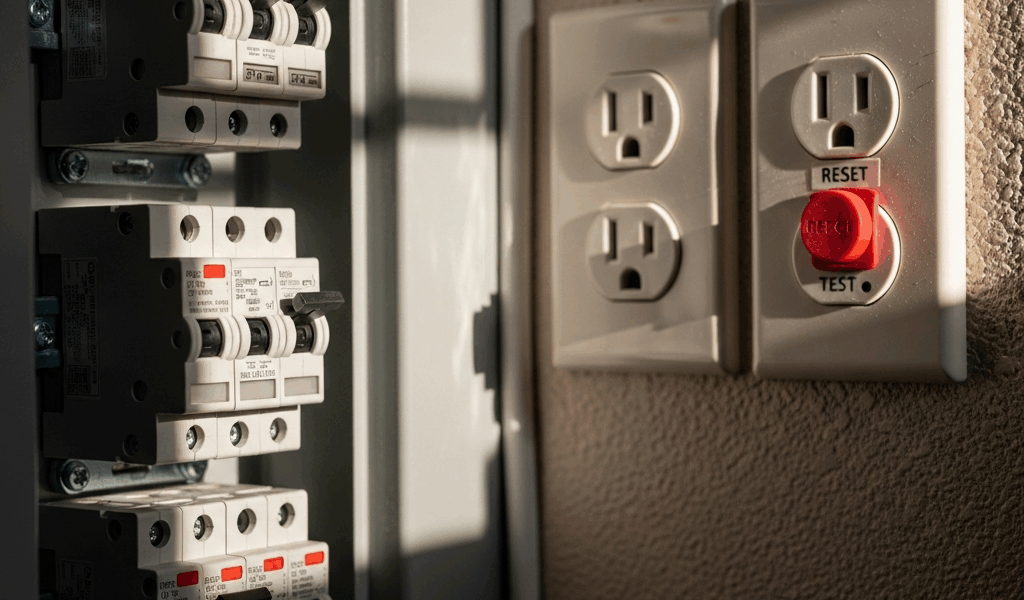
How to Reset the Circuit Breaker After a Power Outage
One of the first things to check is your home’s electrical panel.
A power outage can sometimes cause one or more circuit breakers to trip, particularly if there was a surge or electrical fault.
Steps to Reset a Tripped Breaker
- Locate your home’s electrical panel.
- Identify any breaker that appears to be in the middle position or different from the others.
- Move the affected breaker completely to the OFF position.
- Then move it firmly back to ON.
- Check whether power has been restored to the affected outlets or appliances.
Do not repeatedly reset a breaker that immediately trips again. A breaker that continues to trip can indicate an overloaded circuit, short circuit, faulty appliance, or another electrical problem.
If a breaker repeatedly trips, stop resetting it and have the problem inspected by a qualified electrician.
How to Reset Your Thermostat After a Power Outage
Your thermostat may reset itself when electricity returns, but programmable and smart thermostats can sometimes lose settings or display an incorrect time.
Check the thermostat and confirm:
- Current time
- Temperature setting
- Heating or cooling mode
- Fan setting
- Scheduled programs
- Wi-Fi connection for smart thermostats
If the thermostat display remains blank, check whether its circuit breaker has tripped. Some thermostats also use batteries, so replacing the batteries may be necessary.
Avoid repeatedly switching your heating or cooling system on and off if the electrical supply appears unstable.
How to Reset Your Refrigerator After a Power Outage
A refrigerator usually restarts automatically when electricity returns, but it is important to check that it is actually cooling.
Listen for the compressor or other normal operating sounds and check the interior temperature.
For food safety, avoid opening the refrigerator and freezer unnecessarily during the outage because keeping the doors closed helps maintain the cold temperature.
After power returns:
- Confirm the refrigerator is receiving power.
- Check that the temperature settings are correct.
- Make sure the interior is cooling normally.
- Check for unusual noises or odors.
- Inspect food if the outage lasted long enough to raise safety concerns.
If the refrigerator does not restart, check its dedicated circuit or outlet. Do not repeatedly reset a breaker if it trips again.

How to Reset a Microwave After a Power Outage
Microwaves commonly lose their clock and cooking settings when power is interrupted.
To reset your microwave:
- Make sure it has power.
- Set the correct time.
- Check any programmed settings.
- Test the microwave using a short heating cycle.
If the microwave display remains blank after power returns, check the outlet and circuit breaker.
If you notice sparks, burning smells, damaged wiring, or unusual operation, stop using the appliance and arrange for professional inspection or repair.
How to Reset Your Oven or Stove
Electric ovens and stoves may require their clocks or electronic controls to be reset after an outage.
Check the appliance display and reset:
- Clock
- Cooking programs
- Timer
- Temperature settings
- Smart-home connectivity, if applicable
Some modern ovens may display an error message after a power interruption. Follow the manufacturer’s instructions for clearing the error.
Do not attempt to bypass electrical safety features or repair damaged wiring yourself.
How to Reset Your Wi-Fi Router and Modem
One of the most common post-outage problems is no internet connection.
Even when your home’s electricity has returned, the modem or router may not reconnect correctly.
How to Restart Your Internet
- Turn off or unplug the modem.
- Turn off or unplug the router.
- Wait approximately 30–60 seconds.
- Power the modem back on.
- Wait for its normal connection lights to stabilize.
- Power the router back on.
- Wait for the Wi-Fi network to become available.
- Test your internet connection.
If the internet remains unavailable, check your provider’s service status or contact your internet service provider.
How to Reset Digital Clocks
Power outages can reset clocks throughout your home.
Check:
- Microwave clock
- Oven clock
- Alarm clock
- Coffee maker
- Security system
- Smart displays
- Programmable thermostat
- Digital timers
Resetting these devices is simple but important because incorrect times can affect scheduled heating, alarms, cooking programs, and security functions.
How to Reset a Garage Door Opener
A garage door opener may require attention after a power outage.
First, check whether the opener has electrical power. If it does not respond to the remote, try the wall-mounted control.
Some garage door openers have battery backup systems and may continue operating during an outage. If the backup battery is depleted, the opener may need time to recharge after electricity returns.
If the garage door does not operate correctly, check the manufacturer’s instructions rather than attempting to force the door open or modify its safety mechanisms.

How to Reset Your Security System
Home security systems can sometimes display an error or lose communication after an outage.
Check:
- Control panel
- Alarm status
- Backup battery
- Internet connection
- Door and window sensors
- Cameras
- Smart locks
- Monitoring connection
If the security system uses cellular or internet connectivity, it may take some time to reconnect after power is restored.
Make sure smoke alarms and carbon monoxide alarms are also functioning properly.
Should You Reset All Appliances at Once?
No. It is better to restore appliances gradually.
Turning on multiple high-power appliances simultaneously can create a large electrical demand. Instead, restore essential equipment first and then reconnect other devices one at a time.
A sensible order may be:
- Electrical panel
- Refrigerator/freezer
- Heating or cooling
- Internet equipment
- Security equipment
- Essential lighting
- Kitchen appliances
- Entertainment electronics
- Other nonessential devices
This approach makes it easier to identify a problem if a breaker trips or an appliance fails to restart.
What Should You Do After a Power Surge?
A power outage may sometimes be accompanied by a power surge, particularly when electricity is restored.
Watch for:
- Flickering lights
- Burning smells
- Sparks
- Damaged electronics
- Repeated breaker trips
- Unusual appliance noises
- Devices that will not turn on
If an electronic device appears damaged, unplug it if it is safe to do so and avoid using it until it has been inspected.
Sensitive electronics can benefit from appropriate surge protection. For whole-home protection, consult a qualified electrician about suitable options for your electrical system.
What If Something Still Does Not Work?
If an appliance or electrical circuit does not work after the outage, first determine whether the problem is isolated to that device or affects multiple outlets.
Check:
- Circuit breakers
- Ground-fault circuit interrupter (GFCI) outlets
- Appliance power cords
- Wall outlets
- Manufacturer reset procedures
GFCI outlets can trip during electrical disturbances. If appropriate, press the reset button on the GFCI outlet.
If the outlet does not reset, repeatedly trips, feels hot, or shows signs of damage, stop using it and seek professional assistance.
Frequently Asked Questions
How do I reset my house after a power outage?
Start by checking the electrical panel for tripped breakers. Then restore essential appliances gradually, restart your modem and router, reset clocks and thermostats, check major appliances, and inspect electrical equipment for signs of damage.
Do I need to reset appliances after a power outage?
Some appliances restart automatically, while others lose clocks, settings, or programmed schedules. Check important appliances individually and restore their settings as needed.
Why isn’t my Wi-Fi working after the power comes back?
Your modem or router may not have restarted correctly. Unplug both devices, wait about 30–60 seconds, restart the modem first, allow it to reconnect, and then restart the router.
Why does my breaker keep tripping after a power outage?
Repeated breaker trips can indicate an overloaded circuit, faulty appliance, short circuit, or another electrical issue. Do not repeatedly reset the breaker; contact a qualified electrician if the problem continues.
Should I unplug electronics after a power outage?
If the power supply is unstable or you suspect a surge, unplug sensitive electronics when it is safe to do so. Appropriate surge protection can also help protect electronics from voltage spikes.
Do I need to reset my refrigerator after a power outage?
Most refrigerators restart automatically when power returns. However, confirm that the refrigerator is cooling normally and check its temperature and settings.
Final Thoughts
Knowing how to reset everything after a power outage can help you restore your home safely and efficiently. Start with the electrical panel, inspect for damage, and bring appliances and systems back online gradually instead of switching everything on simultaneously.
Remember to reset thermostats, refrigerator settings, appliance clocks, Wi-Fi equipment, garage door systems, security devices, and other programmable electronics as necessary.
Most importantly, do not ignore warning signs such as burning odors, sparks, damaged outlets, unusual appliance noises, flickering electricity, or repeatedly tripping breakers. These problems can indicate electrical hazards that require professional attention.
A few minutes spent checking and resetting your home’s systems after an outage can help prevent further damage and ensure that everything is operating normally again.
Must Read= Can You Sue Your Electric Company for a Power Outage?
Must Read= How to Prime a Well Pump After a Power Outage (Step-by-Step)